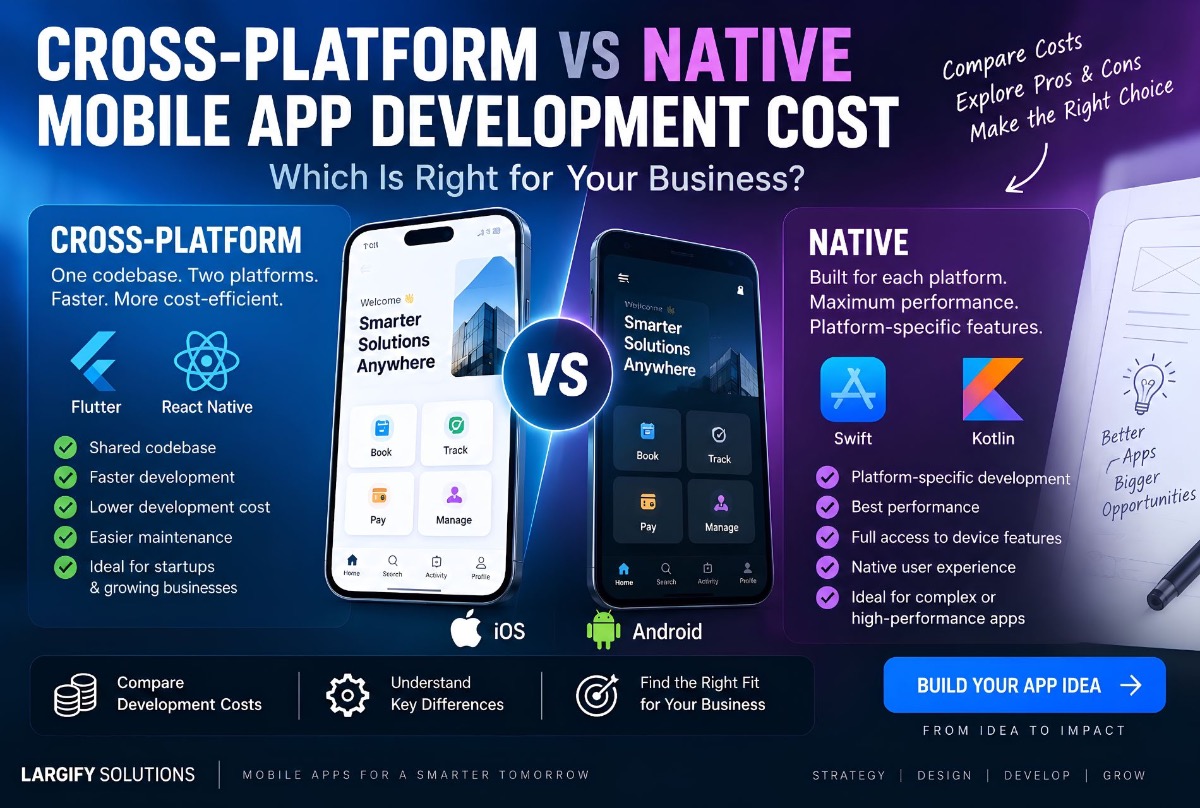
Building a mobile app usually leads to an important technical decision:
Should you build separate native apps for iOS and Android, or use a cross-platform framework such as Flutter or React Native?
The answer affects more than the technology stack. It affects development cost, development time, maintenance, performance, scalability, hiring, testing, and how quickly your product can reach the market.
For a startup or growing business, choosing the wrong approach can mean paying for two codebases when one would have been sufficient. On the other hand, choosing cross-platform development for an application with highly specialized native requirements can create technical limitations later.
This guide explains the difference between native and cross-platform mobile development, compares Flutter and React Native, breaks down the cross platform vs native mobile development cost, and explains when each approach makes sense — aligned with how Largify scopes mobile app development.
What Is Native Mobile App Development?
Native mobile development means building an application specifically for a particular operating system using that platform’s native technologies.
- iOS apps are commonly built with Swift and Apple’s native development tools.
- Android apps are commonly built with Kotlin and Android’s native development tools.
If you want both iOS and Android applications, a fully native strategy generally means maintaining two separate applications.
For example, a booking application with native development means Swift + iOS-specific codebase + App Store deployment, and Kotlin + Android-specific codebase + Google Play deployment. The two apps can provide an excellent platform-specific experience, but they also require more development and maintenance effort.
What Is Cross-Platform Mobile Development?
Cross-platform development allows developers to build applications for multiple platforms from a shared codebase. Popular technologies include Flutter and React Native.
Instead of developing two completely separate applications, a large portion of the application can be developed once and deployed to both iOS and Android. For many business applications, this can significantly reduce development duplication.
Suppose an application requires user registration, login, dashboard, booking, notifications, payments, and profile management. With a cross-platform approach, much of the business logic and interface can be shared. With native development, the same functionality generally needs to be implemented separately for iOS and Android.
That does not mean cross-platform development eliminates platform-specific work completely. Some applications still require native code or platform-specific integrations.
Cross-Platform vs Native: The Core Difference
The simplest way to think about the difference is:
Native development optimizes for the platform. Cross-platform development optimizes for shared development.
Neither approach is automatically better. The right choice depends on the application’s requirements.
| Factor | Native | Cross-Platform |
|---|---|---|
| iOS and Android | Separate implementations | Shared codebase |
| Development cost | Usually higher | Usually lower |
| Initial development time | Longer | Usually shorter |
| Code reuse | Low across platforms | High |
| Platform-specific features | Excellent | Good to excellent, depending on feature |
| Performance | Excellent | Excellent for most business apps |
| Maintenance | Two codebases | Primarily one shared codebase |
| UI consistency | Platform-specific | Easier to maintain consistently |
| Specialized hardware | Best choice | May require native integrations |
| Startup MVP | Often unnecessary | Often a strong option |
Cross Platform vs Native Mobile Development Cost
Cost is one of the biggest reasons businesses consider cross-platform development. However, there is no universal price for a mobile application. A simple app with five screens is fundamentally different from a banking application with complex security, payments, real-time infrastructure, analytics, and multiple user roles.
The following ranges are illustrative planning ranges, not fixed market prices or Largify Solutions quotations.
| Project type | Typical scope | Illustrative development range |
|---|---|---|
| Simple mobile app | Basic screens, authentication, simple API | $4,000 to $10,000 |
| Business mobile app | Login, dashboard, database, workflows, notifications | $10,000 to $25,000 |
| Advanced business app | Multiple roles, payments, integrations, real-time features | $20,000 to $50,000+ |
| Native iOS + Android | Separate native applications with shared backend | $25,000 to $60,000+ |
| Complex platform | Advanced backend, real-time systems, multiple integrations | $50,000 to $100,000+ |
These numbers should be used for early budgeting rather than as a quotation. Actual cost depends on screens, user roles, backend complexity, integrations, design, security, testing, and post-launch support.
Why cross-platform development can cost less
Consider an application that requires approximately 1,000 hours of mobile development work. A simplified native strategy might involve substantial work for iOS, Android, dual testing, and platform-specific maintenance. A cross-platform strategy may allow a large portion of that functionality to be implemented through a shared codebase.
The saving is not simply “build once instead of twice.” There is still testing, platform configuration, app-store preparation, device compatibility work, and sometimes native development. But shared code can reduce duplicated engineering effort.
A $15,000 cross-platform application and a $30,000 native application are not necessarily two versions of the same product. The difference may come from architecture and duplicated platform-specific work.
Flutter vs React Native
Two of the most widely considered cross-platform technologies are Flutter and React Native. Both can be suitable for production applications. The better choice depends on the product, existing engineering expertise, required integrations, and long-term architecture.
What is Flutter?
Flutter is Google’s UI toolkit for building applications across multiple platforms. It uses the Dart programming language and a widget-based approach to interfaces. It is particularly useful when a company wants consistent UI across platforms, high development speed, strong design control, a shared codebase, Android and iOS support, and desktop or web expansion where appropriate.
Flutter can be particularly attractive for startups that want to launch across multiple platforms without maintaining completely separate application codebases — for example EventTech products such as Avoeline that ship Flutter mobile alongside a web application.
What is React Native?
React Native is a cross-platform framework associated with the React ecosystem. It allows developers familiar with JavaScript and React to build mobile applications while sharing a substantial amount of application code.
React Native can be attractive when a business already has React developers, JavaScript or TypeScript expertise, existing React infrastructure, and web and mobile products that need to share development knowledge. It also provides access to native platform capabilities when required.
Flutter vs React Native Comparison
| Factor | Flutter | React Native |
|---|---|---|
| Language | Dart | JavaScript / TypeScript |
| UI approach | Flutter widgets | React components |
| Code sharing | High | High |
| UI consistency | Excellent | Excellent |
| React ecosystem | No | Yes |
| Existing React team | Requires learning Dart | Strong advantage |
| Native integration | Supported | Supported |
| Development speed | High | High |
| Best fit | Custom product experiences | React/JavaScript-heavy teams |
There is no universal winner. A company already operating a large React and TypeScript engineering team may have a strong reason to choose React Native. A product team looking for a highly controlled cross-platform interface may prefer Flutter. The business requirement should determine the technology rather than the other way around.
When Native Development Makes More Sense
Cross-platform development is not always the right answer. Native becomes more attractive when an application depends heavily on platform-specific capabilities:
- Advanced camera functionality — specialized processing or computer vision
- High-performance graphics — games and intensive graphics workloads
- Specialized hardware — sensors, Bluetooth devices, industrial equipment
- Platform-specific UX — deliberately different iOS and Android experiences
- Highly specialized performance — squeezing maximum performance from the device
When Cross-Platform Development Makes More Sense
Cross-platform development is particularly compelling for business applications:
- CRM, booking, salon and cleaning-service apps
- Employee management, customer portals, inventory, delivery
- Real estate, education platforms, business dashboards
- SaaS companion apps and marketplaces
These apps often rely on forms, APIs, databases, authentication, notifications, dashboards, payments, and business workflows — not highly specialized hardware-level functionality. That makes shared-code development attractive. See also related product contexts like Man of Cave (booking + mobile) and multi-branch POS, inventory and bookings.
The Hidden Cost of Native Development
The initial development quotation is not the complete cost. With separate native applications, every major feature can potentially require iOS implementation, Android implementation, dual testing, store deployment, and bug fixing on both platforms.
With a cross-platform architecture, much of the feature can potentially be developed within the shared codebase. There can still be platform-specific work, but duplicated development may be significantly lower. Evaluate total cost of ownership, not just initial development cost — the same TCO mindset as custom ERP vs SaaS cost.
Total Cost of Ownership Comparison
| Cost area | Native iOS + Android | Cross-platform |
|---|---|---|
| Initial development | Higher | Lower in many cases |
| Feature duplication | High | Lower |
| Maintenance | Higher | Usually lower |
| QA | Two platform implementations | Shared + platform testing |
| Bug fixes | Often duplicated | More centralized |
| New feature development | More expensive | Often more efficient |
| Platform-specific work | Excellent | Available when needed |
| Long-term scalability | Excellent | Excellent when properly architected |
Cross-platform does not mean “cheap.” It means the architecture can reduce unnecessary duplication.
What About Performance?
One of the biggest misconceptions is that cross-platform applications are automatically slow. That is no longer a useful generalization. Modern frameworks can deliver excellent performance for many business applications.
A booking application with profiles, scheduling, notifications, payments, dashboards, and API communication does not necessarily need two completely separate native codebases. Performance problems are often caused by poor architecture, inefficient API calls, excessive rendering, poor state management, oversized assets, or inefficient database operations — not simply the choice between cross-platform and native.
Applications with extreme performance requirements should be evaluated differently.
Design Is More Important Than the Framework
A technically excellent application can still fail if the user experience is poor. For business apps, prioritize simple navigation, fast loading, clear forms, useful dashboards, logical workflows, mobile-friendly tables, clear notifications, reliable error handling, and accessible controls. A framework does not automatically create a good product.
Cross-Platform Does Not Mean One-Size-Fits-All
A strong cross-platform architecture can share business logic, API integrations, authentication, data models, validation, state management, and core workflows — while still allowing platform-specific behavior where required.
Shared where possible. Native where necessary. For many businesses, this hybrid approach is better than choosing between “100% cross-platform” and “100% native.”
What About App Store and Google Play Costs?
Development cost is only one part of launching a mobile application. Budget also for Apple and Google developer accounts, cloud infrastructure, database hosting, storage, email/SMS, push notifications, payment gateways, maps APIs, analytics, AI APIs, monitoring, and ongoing maintenance.
Third-party services can become a meaningful operating expense and should be separated from the development budget.
A More Realistic Mobile App Budget
Instead of asking “how much does an app cost?”, ask “what type of application are we building?”
- Basic customer app — login, profile, catalogue, contact, push notifications → cross-platform often practical
- Booking application — accounts, catalogue, calendar, payments, notifications, admin → cross-platform often strong
- Enterprise operations app — multiple roles, inventory, GPS, offline, barcode, real-time workflows → cross-platform can work with careful architecture and possible native integrations
- Hardware-intensive application — specialized sensors, advanced camera, optimized graphics → native may be better
If stakeholders are still mixing “website” and “application,” clarify that first in website vs web application.
How to Choose Between Flutter, React Native and Native
Choose Flutter when:
- You want a highly consistent UI
- You are building a new product
- You want strong cross-platform code sharing
- Your team is comfortable adopting Dart
- You want flexibility across multiple application platforms
Choose React Native when:
- Your team already uses React
- Your organization has strong JavaScript or TypeScript expertise
- Web and mobile teams need overlapping technology knowledge
- You want to leverage the React ecosystem
- Your application requires both shared and native functionality
Choose native when:
- Performance is mission-critical
- The product depends heavily on platform-specific capabilities
- Specialized hardware is involved
- You need deep control over the operating system
- Separate platform experiences are a deliberate product decision
Should a Startup Build Native or Cross-Platform First?
For many startups, the biggest risk is not technical performance — it is spending too much money before validating the product. A cross-platform MVP can reduce duplicated development and potentially get the product into users’ hands faster, then measure acquisition, activation, retention, transactions, feature usage, and feedback.
If the product later develops highly specialized requirements, native components can be introduced where necessary. This is usually better than optimizing for theoretical scale before product-market fit — the same progressive product thinking as building a SaaS without a technical cofounder.
Cross-Platform vs Native for SaaS Businesses
SaaS companies often have an additional consideration: the mobile application may not be the entire product. A SaaS platform may include a web application (admin, management, reports, billing) plus a mobile layer (employee operations, customer access, notifications, field workflows).
In that situation, the mobile application primarily extends the SaaS platform. A cross-platform framework can be particularly useful because the business needs to maintain web and mobile without unnecessarily duplicating mobile engineering. See SaaS product development and products such as ValionOS where mobile is part of a broader operating-system architecture.
Security Should Be Considered From the Beginning
Mobile applications frequently process customer data, employee information, financial transactions, business records, credentials, location, and operational data. Security should be part of the architecture from the beginning: secure authentication, token management, API security, encryption, role-based access, secure storage, input validation, session management, logging, rate limiting, and secure payment integration.
Choosing Flutter, React Native, or native does not replace the need for secure architecture — see also cybersecurity.
The Backend Matters Just as Much as the Mobile App
A mobile application is usually only the visible part of the system: Mobile App → API Layer → Business Logic → Database → Third-Party Integrations.
For a booking application, the backend may determine staff availability, slot conflicts, service eligibility, membership status, payment completion, and notifications. A beautiful mobile application cannot compensate for weak backend architecture — which is why Largify often scopes mobile alongside custom software and API/backend work.
A Practical Architecture for a Business Mobile App
- Mobile layer — Flutter or React Native
- API layer — REST or GraphQL
- Backend — Node.js, Python, Laravel, or another suitable stack
- Database — PostgreSQL or another appropriate database
- Authentication — secure token-based or managed identity services
- Infrastructure — cloud hosting, containers, monitoring, backups, CDN
- Integrations — payments, maps, email, SMS, analytics, AI, accounting
The exact stack should be selected according to the product rather than a fixed checklist.
How to Reduce Mobile App Development Cost
- Start with an MVP that validates the product
- Share code where practical
- Avoid unnecessary custom features
- Reuse backend infrastructure so one API supports web and mobile
- Only build integrations that support current requirements
- Design before development to reduce rework
- Structure for future native requirements even if you start cross-platform
When Cross-Platform Is the Better Business Decision
If the application needs both iOS and Android and does not depend heavily on specialized native functionality, cross-platform development can provide a strong balance between cost, speed, maintainability, user experience, and platform coverage. That makes Flutter and React Native particularly relevant for startups, SaaS companies, SMEs, and businesses digitizing operations.
When Native Is Worth the Extra Cost
The question is not “is native better?” The better question is: Will native capabilities create enough business value to justify the additional development and maintenance cost? If yes, native can be correct. If no, cross-platform may provide a better return on investment.
How Largify Approaches Mobile App Development
At Largify Solutions, mobile applications are treated as part of a broader product architecture rather than isolated interfaces. Engagements can cover product discovery, UX/UI, mobile architecture, Flutter or React Native development, native integrations where required, backend APIs, database architecture, authentication, third-party integrations, testing, deployment, and maintenance.
The technology decision is made according to product requirements. For a business application that needs iOS and Android coverage, cross-platform development can often reduce duplicated engineering. For deeper platform-specific capabilities, native or hybrid architecture may be more appropriate.
The goal is not to select the most fashionable framework. The goal is to build the right product architecture for the business.
Explore Largify’s mobile app development services · start a project conversation.
Final Takeaway
The debate between cross-platform and native is about trade-offs.
- Native — maximum platform-specific control; right for highly specialized applications
- Cross-platform — reduce duplicated engineering and accelerate delivery for dual-platform products
- Flutter — strong shared-codebase control over UI
- React Native — attractive for React/JavaScript/TypeScript organizations
For most business applications, the right question is not “which framework should we use?” It is: What architecture gives us the lowest total cost while still meeting our product, performance, security, and scalability requirements?
Frequently Asked Questions
Is cross-platform mobile development cheaper than native?
It can be. Shared code between iOS and Android can reduce duplicated development and maintenance. Actual cost depends on complexity.
Is Flutter cheaper than native app development?
Flutter can be cheaper when the same application needs both platforms because much of the code can be shared. Savings depend on architecture and requirements.
Is React Native cheaper than native?
Often yes for dual-platform apps. React Native shares substantial application code while still supporting native functionality when needed.
Which is better, Flutter or React Native?
Neither is universally better. Flutter suits highly controlled cross-platform UI; React Native suits teams already experienced with React and TypeScript.
Is cross-platform development good for startups?
Yes, particularly when a startup needs both iOS and Android and wants to validate without maintaining two completely separate mobile codebases.
Are cross-platform apps slower than native apps?
Not necessarily. Modern frameworks can provide excellent performance for many business apps. Extreme performance or specialized hardware cases should be evaluated individually.
Can a cross-platform app use native features?
Yes. Flutter and React Native can integrate with native platform capabilities when required.
Can I start with Flutter or React Native and move to native later?
Yes, but migration is not automatic. A well-designed architecture makes it easier to introduce native components when requirements change.
How much does mobile app development cost?
There is no single price. Simple business apps may cost several thousand dollars; complex enterprise platforms can require tens of thousands or more. Screens, roles, integrations, backend workflows, security, and platform targets all affect cost.
Should I build iOS and Android separately?
Only when the product has a strong reason for separate native implementations. For many business applications, cross-platform is a more efficient route to both platforms.
Build the Right Mobile Architecture
The most expensive mobile development decision is not choosing Flutter instead of React Native, or native instead of cross-platform. It is building the wrong architecture for the product.
Before development starts, define users, workflows, required platforms, essential device capabilities, backend systems, integrations, MVP, expected scale, maintenance plan, and which features genuinely require native development. Once those questions are answered, the technology choice becomes much easier.
Largify Solutions can help define the product architecture, select the appropriate development approach, and build from MVP through production — mobile app development · build your product.