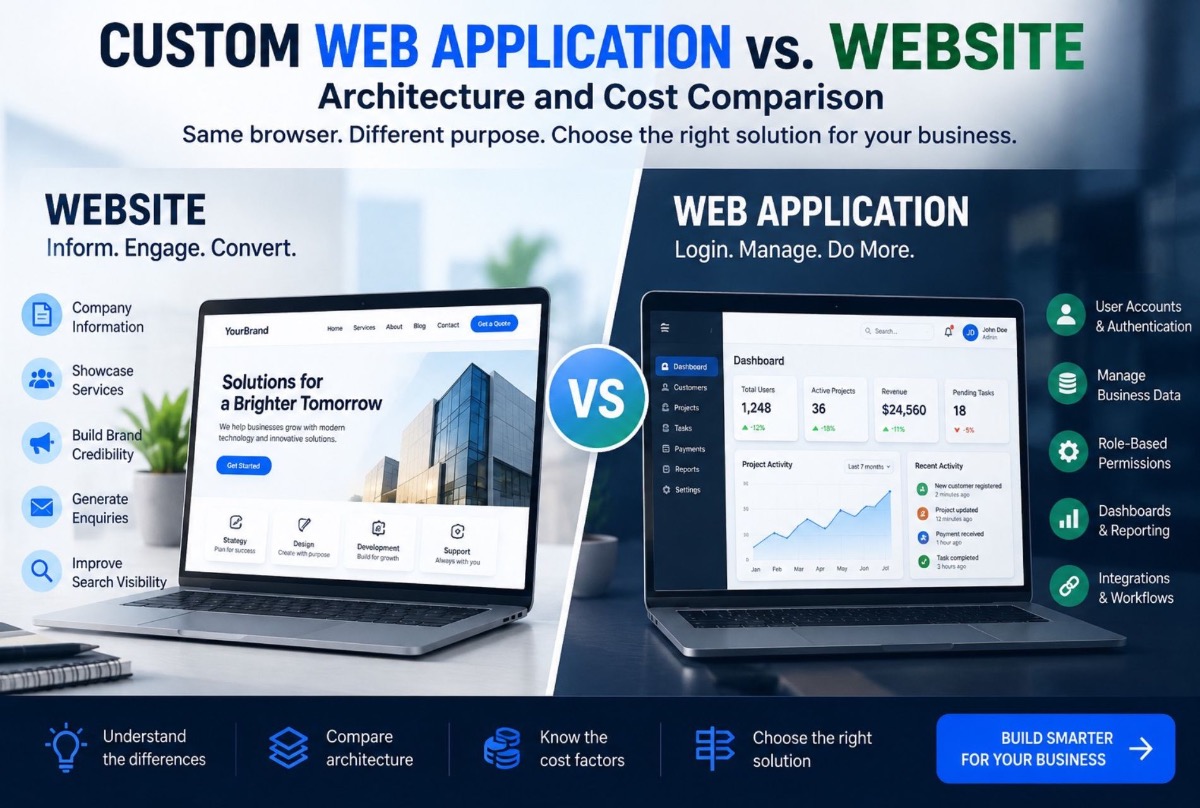
A business website and a web application may look similar from the outside. Both open in a browser. Both can use a domain name. Both can be built with modern technologies.
The difference is what happens after the visitor arrives.
A traditional website primarily presents information. A web application allows users to perform actions, manage data, and interact with business processes.
That distinction matters when deciding what your business actually needs. If you only need to explain what your company does, a website may be enough. If customers, employees, vendors, or administrators need to log in and perform tasks, you are probably dealing with a web application.
Website vs Web Application: The Simple Difference
Think about the difference between a restaurant menu and a restaurant management system.
The menu tells you what is available, how much it costs, where the restaurant is, and how to contact it. A management system lets someone create bookings, manage customers, process orders, track inventory, manage staff, and view reports.
The first is primarily informational. The second is operational. That is the simplest way to understand the difference between a website and a web application.
What Is a Traditional Website?
A traditional business website is primarily designed to communicate information. Typical pages include Home, About, Services, Products, Pricing, Blog, Contact, and FAQs.
The main visitor journey is usually: Visit → Read → Understand → Contact / Purchase.
Examples include company websites, agency websites, restaurant websites, portfolio sites, corporate and marketing websites, and service-business websites. The primary objective is communication and conversion — which is what Largify’s web development work covers when the need is a professional digital presence.
What Is a Web Application?
A web application is software that runs through a web browser. Instead of simply reading information, users interact with the system:
Login → Dashboard → Create customer → Create booking → Process payment → Generate report
The application may contain authentication, user accounts, databases, dashboards, forms, workflows, notifications, payments, APIs, role-based permissions, and business logic. The browser becomes the interface to an operational software system — closer to custom software development than a brochure site.
The Key Difference Is Function, Not Appearance
A common mistake is judging the difference based on design. A sophisticated website can look like an application. A simple application can look like a basic website.
Visual appearance is not the defining factor. The better question is:
Does the user primarily consume information, or do they perform actions that change business data?
If users mostly consume information, you likely need a website. If users create, modify, manage, or analyze data, you likely need a web application.
Website vs Web Application Comparison
| Feature | Business Website | Web Application |
|---|---|---|
| Public information | Yes | Sometimes / also |
| User accounts | Optional | Usually |
| Database | Basic / optional | Core component |
| Dashboards | Limited | Common |
| Business workflows | Limited | Core functionality |
| User permissions | Basic | Often required |
| Data management | Limited | Extensive |
| Payments | Possible | Often integrated |
| Automation | Limited | Common |
| APIs | Optional | Frequently required |
| Internal operations | Limited | Strong use case |
| Custom business logic | Limited | Extensive |
There is also a third option. Many modern businesses need both.
When a Business Needs Both
Consider an online service company. The public website might contain Home, Services, Pricing, About, and Contact. Customers may also need login, a dashboard, bookings, invoices, payments, and service history. Employees may need assigned jobs, schedules, customer details, and job status. Administrators may need customers, staff, bookings, finance, and reports.
At that point, the company is no longer building just a website. It is building a web application connected to a public website — the same pattern as platforms like Ragdoll Properties (listings + enquiry workflows) or booking-led products such as Man of Cave.
Examples of Web Applications
- Customer portals — log in, view orders, download invoices, make payments, submit requests, track progress
- Booking systems — select service, location, staff, time, confirm, receive notifications
- CRM systems — manage leads, record interactions, assign deals, monitor sales activity
- ERP systems — customers, sales, inventory, finance, staff, operations, reporting (custom ERP development)
- Marketplaces — customers, providers, and administrators on one platform with different permission sets (e.g. Barristrly or Digi Labour)
The Architecture Is Different
Typical website architecture
A basic website can often follow: Browser → Web Server → Website Content, sometimes with a CMS, contact forms, analytics, search, payment integration, hosting, CDN, and SEO infrastructure. The architecture can remain relatively straightforward.
Typical web application architecture
A more complex application may involve: Browser → Frontend → API / Backend → Database, along with authentication, authorization, file storage, background jobs, notifications, external APIs, logging, monitoring, admin systems, and reporting.
Example chain: customer books appointment → application checks availability → database confirms staff schedule → booking created → payment processed → notification sent → dashboard updated. That chain is business software.
Why Database Design Matters
A brochure website may not require extensive structured data. A web application usually does.
Imagine a booking platform with customers, staff, services, branches, bookings, payments, and products. A customer has many bookings; a booking belongs to customer + staff + branch + service. The system needs to maintain those relationships reliably — which is why web application development requires more than designing screens. The underlying data model matters just as much. Multi-location versions of this problem are covered in multi-branch management systems.
Authentication Changes Everything
The moment users need accounts, the application becomes more operational: registration, login, password recovery, email verification, session management, two-factor authentication, role-based access, and account settings.
Different users need different permissions — owner (everything), manager (assigned branches), employee (assigned tasks), customer (only their own information). That permission model needs to be designed into the application.
Web Applications Often Need Integrations
Business software rarely operates alone. A web application may connect to payment gateways, email platforms, WhatsApp, accounting, CRM, calendars, shipping, authentication, AI, and analytics.
Example: Website → Lead form → CRM → AI lead qualification → sales notification. That is more than a website form — it is a business workflow, often spanning AI & automation and Digital Marketing.
Custom Web Application vs Off-the-Shelf Software
Building a web application does not automatically mean building everything from scratch.
- Off-the-shelf software — faster deployment, lower initial development cost, established features; limited customization, subscription costs, integration constraints
- Customized existing platform — extend a product that already matches most requirements
- Custom web application — designed around your organization’s workflows when existing software cannot handle them efficiently
Custom development should not be the default answer. Compare requirements honestly — including the custom ERP vs SaaS cost trade-off when operations are the real problem.
How Much Does a Website Cost Compared With a Web Application?
There is no single price for either type of project. A five-page marketing website, a customer portal, and a multi-role business platform are completely different projects. A useful way to think about cost is by complexity level:
| Project type | Typical scope | Main cost drivers |
|---|---|---|
| Business website | Pages, CMS, forms, SEO structure | Design, pages, content, integrations |
| Advanced business website | Website + booking, payments, advanced forms | Integrations, custom functionality, workflows |
| Small web application | Login, dashboard, database, basic workflows | Backend, authentication, database, permissions |
| Business web application | Multiple roles, workflows, reporting, integrations | Architecture, APIs, permissions, business logic |
| SaaS platform | Multi-tenant product, billing, accounts, administration | Product architecture, tenancy, billing, security, scalability |
These are categories, not fixed quotations. The same category can contain projects with very different requirements. For SaaS-shaped products, see SaaS product development.
A Simple Illustrative Cost Comparison
Consider three hypothetical projects. These are illustrative planning examples only — not Largify’s published pricing.
Example A: Company website
Suppose a company needs 10–15 pages, custom design, CMS, contact forms, basic integrations, analytics, and SEO-ready structure. Most of the work is design + frontend + CMS + content + deployment. There may be no complex user accounts, business database, or internal workflow. Scope is relatively contained.
Example B: Customer web application
Now customers create accounts, book services, make payments, view invoices, track requests, and receive notifications — while employees manage customers, bookings, statuses, and schedules. The system requires frontend + backend + database + authentication + permissions + payments + notifications + business logic. Scope is significantly larger.
Example C: Full business platform
Add multiple branches, staff management, inventory, CRM, finance, reporting, admin controls, multiple integrations, and advanced permissions. The project has moved into a business operating platform. Cost is driven by business rules, data relationships, workflows, integrations, and user roles — not screen count.
Why a 20-Page Website Can Cost Less Than a 10-Screen Application
Project 1: 20 informational pages (company, services, case studies, blog, contact). Project 2: 10 application screens where users log in, create records, upload documents, make payments, manage appointments, and view personalized information.
Project 2 can require considerably more engineering because every action connects to business logic and persistent data. The number of screens does not tell you the complexity of the software.
What Actually Determines Web Application Development Cost?
- User roles — customers, employees, managers, vendors, administrators each add permissions and workflows
- Business workflows — “submit form → email” is different from qualification → assignment → approval → payment → fulfillment → reporting
- Database complexity — interconnected customers, products, orders, employees, branches, payments, inventory, documents, tasks
- Integrations — API development, auth, error handling, sync, monitoring, maintenance
- Security — controls for customer, financial, or operational data
- Reporting — complex reporting across entities needs more data modeling
- Automation and AI — notifications, approvals, scheduled jobs, AI processing, orchestration
- Mobile — responsive web is different from separate mobile apps (cross-platform vs native cost)
Development Cost Is Only Part of the Cost
A common mistake is comparing website development price against web application development price and stopping there. For a serious business application, consider total ownership:
Total Cost of Ownership = Development + Infrastructure + Maintenance + Support + Future Changes
That is more realistic than comparing development invoices alone. If the real pain is spreadsheets and manual processes, also read when to replace spreadsheets with custom software.
When Should You Build a Custom Web Application?
Consider custom development when your workflow is unusual, multiple departments need one system, existing software forces inefficient processes, several SaaS products need to exchange data, you need custom permissions or specialized logic, you need a customer/partner portal or proprietary platform, or you plan to turn the software into a SaaS product.
If the requirement is simply “we need a professional company website,” you probably do not need a custom web application. If customers need to book, pay, track orders, manage accounts, and interact with staff, you are likely building an application.
How Should You Budget a Web Application?
Instead of asking “how much does a web application cost?”, break the project into: product definition, UX/UI, application engineering, integrations, quality and security, and deployment/maintenance. That gives a much better basis for estimating cost.
Do Not Confuse More Features With More Value
Many projects fail when the brief becomes CRM + ERP + AI + mobile + marketplace + analytics + chat + automation — and six months later employees still use spreadsheets. Optimize for workflows, not feature catalogues.
What business process are we trying to make faster, cheaper, or more reliable?
Then build the software around that process.
A Better Way to Scope a Web Application
- Identify users — customer, employee, manager, administrator, partner
- Identify their jobs — e.g. customer books a service; employee completes it; manager monitors performance; owner reviews revenue
- Map the workflow — lead → qualification → booking → service → payment → follow-up
- Identify the data the system must store
- Identify integrations
- Define the MVP — smallest version that solves the core problem, then expand
Responsive Website vs Web Application
“Our website works on mobile, so it is basically a web application” confuses two concepts. Responsive design means the interface adapts across screen sizes. A responsive website can still be purely informational. A web application can also be responsive. Responsive describes device behavior; web application describes what the software does.
Can a Website Become a Web Application?
Yes. A business may start with a marketing website and gradually introduce application functionality: company website → online booking → customer accounts → customer dashboard → staff portal → admin management system. At that point the website has evolved into a broader digital platform — useful when the business does not need the complete system on day one.
Web Application Security Matters
Operational applications may contain customer information, financial data, business records, employee data, credentials, and internal documents. Security should be part of the architecture from the beginning: authentication, authorization, input validation, secure sessions, encryption, database and API security, logging, backups, and access controls — not a final pre-launch checklist. See also Largify’s cybersecurity services when security is a primary engagement driver.
Website or Web Application? Use This Test
- Do visitors mainly need to read information? → Website
- Do users need accounts? → Probably a web application
- Does the system need to store and modify business data? → Web application
- Do different users need different permissions? → Web application
- Does the software need to execute business workflows? → Web application
If you answered yes to several of the last four questions, building only a traditional website may create limitations later.
The Hybrid Model Is Often the Best Choice
Many modern businesses need a public website + web application + admin portal + APIs. The public site handles acquisition and communication. The application handles customers and operations. The admin portal handles management. APIs connect the components.
What ValionOS Shows About the Difference
Largify’s ValionOS is positioned as an AI-powered business operating system built around connected business operations — not a conventional marketing website. Users are not simply reading pages; they are interacting with operational software. Read the ValionOS case study or explore ValionOS.
A Relevant Largify Project Example
Largify’s work with Ragdoll Properties is a useful example. A property website can display listings. A property platform can also manage workflows around those listings and enquiries — introducing application logic, structured data, users, and operational processes.
How Largify Approaches Web Application Development
Largify Solutions builds custom web applications for businesses that need more than a standard marketing website — customer portals, dashboards, booking systems, CRM platforms, operational software, marketplaces, SaaS platforms, ERP-connected applications, and AI-powered workflows.
The important distinction is not whether a project is technically impressive. It is whether the software fits the business process.
Explore Largify’s web development services · custom software · start a project conversation.
Final Takeaway
A website answers: “Who are you and what do you offer?”
A web application answers: “How can users interact with your business and complete work?”
If your company only needs an online presence, build a website. If customers, employees, managers, or partners need to log in, manage data, complete workflows, or interact with business systems, you probably need a web application. And if you need both customer acquisition and operational software, build them as connected parts of the same digital ecosystem.
The expensive mistake is not choosing the wrong technology. It is building a website when the business actually needs software.
If you are unsure which direction your project needs, Largify can help assess whether a conventional website, custom web application, or hybrid architecture makes the most sense — and compare that with spreadsheet replacement when the underlying problem is an internal workflow.
Frequently Asked Questions
What is the difference between a website and a web application?
A website primarily provides information to visitors, while a web application allows users to interact with data, accounts, workflows, and business functions.
Is a web application more expensive than a website?
Usually yes, because web applications generally require databases, authentication, business logic, permissions, workflows, and potentially third-party integrations.
Does every business need a web application?
No. Many businesses only need a professional website. A web application becomes relevant when users need to perform operational tasks through the browser.
Can a website have login functionality?
Yes. Adding login does not automatically mean the entire site is a web application, but authenticated dashboards and user workflows generally move the project into application territory.
Can a web application also have a public website?
Yes. This is a common architecture: public website for marketing and acquisition; application for authenticated users and operations.
Should I build a custom web application or use SaaS software?
Start by comparing requirements with existing SaaS products. Custom development becomes more appropriate when existing tools cannot support your workflows, integrations, permissions, or business model effectively.
How long does it take to build a custom web application?
It depends on scope. A small portal can be built much faster than a multi-role business platform or SaaS product. Workflow complexity matters more than page count.
Can a web application be converted into a mobile app?
Often yes. A well-designed web application’s backend and APIs can support mobile clients, though the mobile interface and some functionality may need separate development.
What technologies are used to build web applications?
Modern stacks commonly include React, Next.js, TypeScript, Node.js, Python, Laravel, PostgreSQL, Firebase, and Supabase, depending on requirements. Largify selects technologies based on the product’s architecture needs.
What should I prepare before hiring a web application development company?
Prepare user roles, core workflows, required features, existing software, integrations, reporting requirements, and the main business problem you want the application to solve.